

7.3. Dictionary Patterns#
Dictionaries support three recurring tasks: transforming existing data, counting and grouping observations, and modeling records with useful keys. Start by choosing what each key means and what its value should hold.
Task |
Key |
Value |
Pattern |
|---|---|---|---|
Transform prices |
Fruit name |
Adjusted price |
Comprehension |
Count observations |
Observed category |
Frequency |
Counting loop or |
Group records |
Shared category |
List of records |
|
Store a record |
Field name |
Field value or inner dictionary |
Nested dictionary |
Look up by two fields |
Tuple of fields |
Associated value |
Tuple key |
The examples first show the loop and the resulting data, then introduce a shorter form. Lookup performance and memoization appear at the end as extensions.
7.3.1. Transforming Dictionary Data#
7.3.1.1. Iterate Through Keys and Values#
A loop over a dictionary visits its keys in insertion order. Use values() when only the values matter and items() when you need both. Insertion order is not alphabetical order; use sorted() when a report needs a sorted presentation.
counter = {'b': 1, 'a': 3, 'n': 2}
print(counter)
{'b': 1, 'a': 3, 'n': 2}
The following loop prints the keys, which are the letters.
for key in counter:
    print(key)
b
a
n
To print the values, we can use the values method.
for value in counter.values():
    print(value)
1
3
2
Use items() to obtain each (key, value) pair directly. Tuple unpacking gives the two parts meaningful names.
for letter, frequency in counter.items():
    print(letter, frequency)
b 1
a 3
n 2
### Exercise: Iterating Through a Dictionary
# Use this dictionary:
# 1. Print only the names (keys).
# 2. Print only the scores (values).
# 3. Print each name and score together using .items().
scores = {"alice": 92, "bob": 85, "charlie": 78}
### Your code starts here.


### Your code ends here.
alice
bob
charlie
92
85
78
alice 92
bob 85
charlie 78
keys(), values(), and items() return views: they reflect later changes to the dictionary. A list made from a view is a snapshot. You can update existing values while iterating, but do not add or remove keys from the dictionary being traversed. Build a new dictionary or iterate over a snapshot when changing its entries.
prices = {'apple': 1.20, 'banana': 0.50}
keys_view = prices.keys()
keys_snapshot = list(prices)
prices['cherry'] = 2.00
print('View:', list(keys_view))
print('Snapshot:', keys_snapshot)
View: ['apple', 'banana', 'cherry']
Snapshot: ['apple', 'banana']
7.3.1.2. Build and Filter with a Comprehension#
A dictionary comprehension builds a new dictionary from an iterable. Each iteration produces a key and a value:
{key_expr: value_expr for item in iterable if condition}
The if clause is optional. Start with a loop when the transformation has several steps; use a comprehension when the key, value, and condition remain easy to read.
prices = {'apple': 1.20, 'banana': 0.50, 'cherry': 2.00}
discounted = {}
for fruit, price in prices.items():
    discounted[fruit] = round(price * 0.9, 2)
print(discounted)

# Same transformation, expressed as a comprehension.
discounted = {fruit: round(price * 0.9, 2) for fruit, price in prices.items()}
print(discounted)

# Keep entries that meet the condition.
pricey = {fruit: price for fruit, price in prices.items() if price > 1.00}
print(pricey)
{'apple': 1.08, 'banana': 0.45, 'cherry': 1.8}
{'apple': 1.08, 'banana': 0.45, 'cherry': 1.8}
{'apple': 1.2, 'cherry': 2.0}
### Exercise: Dictionary Comprehension
# 1. Use a dict comprehension to create a dictionary that maps
#    each number 1-5 to its cube (n**3).
# 2. Given the prices dict below, use a dict comprehension to keep
#    only fruits that cost more than $1.00.
prices = {'apple': 1.20, 'banana': 0.50, 'cherry': 2.00, 'grape': 0.80}
### Your code starts here.


### Your code ends here.
Cubes: {1: 1, 2: 8, 3: 27, 4: 64, 5: 125}
Pricey: {'apple': 1.2, 'cherry': 2.0}
7.3.2. Counting and Grouping Observations#
7.3.2.1. Count with a Dictionary#
To count observations, use each observed value as a key and its frequency as the value. After each loop iteration, the dictionary holds the counts for everything seen so far. A new key starts at one; an existing key increases by one.
counter = {}
As we loop through the letters in the string, suppose we see the letter 'a' for the first time.
We can add it to the dictionary like this.
counter['a'] = 1
The value 1 indicates that we have seen the letter once.
Later, if we see the same letter again, we can increment the counter like this.
counter['a'] += 1
Now the value associated with 'a' is 2, because we’ve seen the letter twice.
counter
{'a': 2}
The following function uses these features to count the number of times each letter appears in a string.
def value_counts(values):
    """Count occurrences of hashable values in an iterable."""
    counts = {}
    for value in values:
        if value not in counts:
            counts[value] = 1
        else:
            counts[value] += 1
    return counts
The loop handles first and repeated occurrences separately. The same function works on a string of letters or a list of categories, because both provide one value per iteration.
counter = value_counts('brontosaurus')
counter
{'b': 1, 'r': 2, 'o': 2, 'n': 1, 't': 1, 's': 2, 'a': 1, 'u': 2}
The items in counter show that the letter 'b' appears once, 'r' appears twice, and so on.
The expression counts.get(value, 0) + 1 combines the two cases. get() returns the existing count or zero without inserting anything; the assignment stores the incremented count.
departments = ['sales', 'ops', 'sales', 'data', 'ops', 'ops']
counts = {}
for department in departments:
    counts[department] = counts.get(department, 0) + 1
print(counts)
{'sales': 2, 'ops': 3, 'data': 1}
### Exercise: Counting with a Dictionary
# 1. Write a counting loop for the observations below.
# 2. Use .get(fruit, 0) + 1 to handle both first and repeated occurrences.
# 3. Print the counts and check that their sum equals the number of observations.
fruits = ['apple', 'banana', 'apple', 'cherry', 'banana', 'apple']
### Your code starts here.


### Your code ends here.
{'apple': 3, 'banana': 2, 'cherry': 1}
True
7.3.2.2. Count with Counter#
Counter from collections implements the counting pattern for hashable values. Use the manual loop to understand how counts are accumulated, then use Counter when the task is simply counting. Its most_common(n) method returns the leading (value, count) pairs.
from collections import Counter

# Counter accepts a string, list, or any iterable
counts = Counter('brontosaurus')
print(counts)

# most_common(n) returns the n highest-frequency items as (element, count) pairs
print(counts.most_common(3))
Counter({'r': 2, 'o': 2, 's': 2, 'u': 2, 'b': 1, 'n': 1, 't': 1, 'a': 1})
[('r', 2), ('o', 2), ('s', 2)]
from collections import Counter

a = Counter('aab')
b = Counter('abc')
print('a:    ', a)
print('b:    ', b)
print('a + b:', a + b)   # add counts
print('a - b:', a - b)   # subtract, drop non-positive
print('a & b:', a & b)   # intersection: min of each count
print('a | b:', a | b)   # union: max of each count
a:     Counter({'a': 2, 'b': 1})
b:     Counter({'a': 1, 'b': 1, 'c': 1})
a + b: Counter({'a': 3, 'b': 2, 'c': 1})
a - b: Counter({'a': 1})
a & b: Counter({'a': 1, 'b': 1})
a | b: Counter({'a': 2, 'b': 1, 'c': 1})
### Exercise: Counter
# Given the list of words below:
# 1. Use Counter to count word frequencies.
# 2. Print the two most common words with their counts (tab-separated).
# 3. Create a second Counter for ['banana', 'cherry', 'date'] and print
#    the combined counts using +.
words = ['apple', 'banana', 'apple', 'cherry', 'banana', 'apple']
### Your code starts here.


### Your code ends here.
Counter({'apple': 3, 'banana': 2, 'cherry': 1})
3	apple
2	banana
Counter({'apple': 3, 'banana': 3, 'cherry': 2, 'date': 1})
7.3.2.3. Group with defaultdict#
Grouping collects several values under one key. For example, a student’s name can map to a list of course codes. With a regular dictionary, create the list before appending. setdefault(key, []) returns the existing list or inserts and returns a new one.
defaultdict(list) automates that step when you access a missing key with square brackets. The factory function, list, creates a separate empty list for each new key. Use defaultdict(int) for numeric accumulation because int() produces zero.
records = [('Ana', 'CS101'), ('Ben', 'CS101'), ('Ana', 'DS201')]
courses = {}
for name, course in records:
    courses.setdefault(name, []).append(course)
print(courses)
{'Ana': ['CS101', 'DS201'], 'Ben': ['CS101']}
from collections import defaultdict

# int factory: missing keys default to 0 — no KeyError, no if-check needed
word_count = defaultdict(int)
for word in 'the cat sat on the mat and the cat sat'.split():
    word_count[word] += 1

print(dict(word_count))
{'the': 3, 'cat': 2, 'sat': 2, 'on': 1, 'mat': 1, 'and': 1}
from collections import defaultdict

# list factory: group records by a key — no "if key not in d" needed
records = [
    ('alice', 'CS101'), ('bob', 'CS101'),
    ('alice', 'DS201'), ('charlie', 'CS101'),
    ('bob',   'DS201'),
]

courses = defaultdict(list)
for name, course in records:
    courses[name].append(course)   # first access auto-creates an empty list

for name, taken in courses.items():
    print(name, taken)
alice ['CS101', 'DS201']
bob ['CS101', 'DS201']
charlie ['CS101']
### Exercise: defaultdict
# 1. Use defaultdict(list) to group sales amounts by region.
# 2. Use defaultdict(int) to compute total sales per region.
# 3. Print both results.
sales = [
    ('north', 120), ('south', 85), ('north', 200),
    ('east', 60),   ('south', 150), ('east', 90),
]
### Your code starts here.


### Your code ends here.
{'north': [120, 200], 'south': [85, 150], 'east': [60, 90]}
{'north': 320, 'south': 235, 'east': 150}
Choose missing-key behavior deliberately:
Operation |
If the key is absent |
Changes the dictionary? |
|---|---|---|
|
Raises |
No |
|
Returns the fallback |
No |
|
Inserts and returns the fallback |
Yes |
|
Creates, stores, and returns a factory value |
Yes |
|
Returns |
No |
A required field can use bracket access so missing data is visible. An optional field can use get(). Grouping can use setdefault() or defaultdict to create containers as needed.
from collections import defaultdict

groups = defaultdict(list)
print('get:', groups.get('north'))
print('After get:', dict(groups))
print('brackets:', groups['north'])
print('After brackets:', dict(groups))
get: None
After get: {}
brackets: []
After brackets: {'north': []}
7.3.2.4. Invert a Mapping without Losing Data#
Inverting a dictionary makes its values into keys. Those values must therefore be hashable. If several original keys share a value, collect them in a list so every association survives.
For example, count the letters in parrot, then group the letters by frequency.
d = value_counts('parrot')
d
{'p': 1, 'a': 1, 'r': 2, 'o': 1, 't': 1}
If we invert this dictionary, the result should be {1: ['p', 'a', 'o', 't'], 2: ['r']}.
That means the letters that appear once are 'p', 'a', 'o', and 't', and the letter that appears twice is 'r'.
The following function takes a dictionary and returns its inverse as a new dictionary.
def invert_dict(d):
    new = {}
    for key, value in d.items():
        if value not in new:
            new[value] = [key]
        else:
            new[value].append(key)
    return new
The for loop walks through the keys and values in d.
If the value is not already in the new dictionary, we create a list with one key.
Otherwise we append the key to the existing list.
We can test it like this:
invert_dict(d)
{1: ['p', 'a', 'o', 't'], 2: ['r']}
When every original value is unique and hashable, a comprehension can swap each pair directly.
codes = {'apple': 'APL', 'banana': 'BAN', 'cherry': 'CHR'}

code_to_fruit = {code: fruit for fruit, code in codes.items()}   ### swap each pair
code_to_fruit
{'APL': 'apple', 'BAN': 'banana', 'CHR': 'cherry'}
The loop variables fruit, code unpack each key-value pair, and the expression code: fruit puts them back in reverse order.
Now you can look up a fruit by its code, as in code_to_fruit['BAN'].
This shortcut works only when the values are unique.
A dictionary can hold each key only once, so if two keys share a value, the later key overwrites the earlier one.
Here is what happens if you swap the letter counts for parrot:
{count: letter for letter, count in d.items()}
{1: 't', 2: 'r'}
The letters 'p', 'a', and 'o' are lost, because each later letter with a count of 1 replaced the one before it.
Use the comprehension when you know the values are unique, such as ID numbers or product codes.
Use invert_dict when values can repeat and you need to keep every key.
### Exercise: Inverting a Dictionary
#   Given the dictionary below that maps student names to grades,
#   use invert_dict() to find all students who received each grade.
#   Print the inverted dictionary.
grades = {'Alice': 'A', 'Bob': 'B', 'Carol': 'A', 'Dave': 'C', 'Eve': 'B'}
### Your code starts here.


### Your code ends here.
{'A': ['Alice', 'Carol'], 'B': ['Bob', 'Eve'], 'C': ['Dave']}
7.3.2.5. Sorting Dictionaries#
Sometimes you want to sort dictionary items by their values rather than their keys.
We can define a small helper that returns the second element of a (key, value) pair.
def second_element(t):
    return t[1]
Then we pass that function as the optional key argument to sorted.
The key function computes a sort key for each item.
counter = value_counts('parrot')
items = counter.items()
sorted_items = sorted(items, key=second_element)
sorted_items
[('p', 1), ('a', 1), ('o', 1), ('t', 1), ('r', 2)]
The sort key determines the order. The letter with the lowest count appears first, and the highest count appears last. So we can find the most common letter like this:
sorted_items[-1]
('r', 2)
If we only want the maximum, we don’t have to sort the list.
We can use max, which also accepts a key function.
max(items, key=second_element)
('r', 2)
### Exercise: Sorting by Value
#   1. Count the letter frequencies in the word 'mississippi'.
#   2. Sort the resulting items by frequency (value), ascending.
#   3. Print the letter with the highest frequency using max() with a key function.
### Your code starts here.


### Your code ends here.
[('m', 1), ('p', 2), ('i', 4), ('s', 4)]
i
For tied counts, max() returns the first maximal item encountered; sorting is stable, so equal-count items keep their input order. In mississippi, both i and s appear four times. A report should make its tie policy explicit. max() requires at least one item unless you supply a default.
7.3.3. Modeling Records and Compound Keys#
7.3.3.1. Choose Hashable Keys#
A hashable object has a hash value that stays stable during its lifetime, and equal objects must have equal hashes. Dictionaries use the hash to narrow the search, then compare keys for equality. Different keys may share a hash, so a hash is not a unique identifier.
Strings and numbers are familiar hashable keys. Lists, dictionaries, and sets are not hashable. A tuple is hashable only when all of its elements are hashable. Hashability and immutability are related, but they are not interchangeable rules for every Python object.
Choose keys that identify the thing you need to retrieve: a student ID for one record, a course code for one roster, or a tuple for a combination of fields. Values can be mutable objects, including lists and dictionaries.
A hash value is just an integer that represents an object, computed by the hash() function.
Type(s) |
Mutability/Conditional |
Hashable |
Example |
|---|---|---|---|
|
Immutable |
Yes |
|
|
Immutable |
Yes |
|
|
Immutable, conditional on all elements being hashable |
Yes (conditional) |
|
|
Immutable, conditional on all elements being hashable |
Yes (conditional) |
|
|
Immutable |
Yes |
|
|
Immutable singleton |
Yes |
|
Functions, classes |
Identity-based objects |
Yes (by identity) |
|
|
Mutable |
No |
|
|
Mutable |
No |
|
|
Mutable |
No |
|
|
Mutable |
No |
|
Here are a few quick checks. Equal tuples have equal hashes, and tuples of hashable elements are hashable.
a = (1, 2)
b = (1, 2)
a == b, hash(a) == hash(b)      ### return True, True

hash((1, (2, 3)))               ###  hashes a nested tuple, returning the large number shown
7267574591690527098
%%expect TypeError
mixed = (1, [2, 3])
d = {mixed: 'not hashable'}
TypeError: unhashable type: 'list'
7.3.3.2. Store Nested Records#
A dictionary stored as a value inside another dictionary is a nested dictionary. Nesting groups related fields, such as a student record containing several grades. JSON objects can also be represented with dictionaries.
To reach an inner value, chain the keys: the outer key first, then the inner key.
student = {
    "name": "Alice",
    "grades": {"math": 88, "science": 92},
    "clubs": ["robotics"],
}

print(student["grades"])             # the inner dictionary
print(student["grades"]["math"])     # 88
{'math': 88, 'science': 92}
88
Read the chain from left to right, one level at a time: student["grades"] evaluates to the inner dictionary, and ["math"] is then applied to that inner dictionary.
To change the inner dictionary, reach it the same way and then use any dictionary operation on it. Because student["grades"] is the inner dictionary, not a copy, the change is visible through student.
grades = student["grades"]                   ### an alias for the inner dict, not a copy
grades["math"] = 90                          ### update an existing inner key
student["grades"].update({"history": 78})    ### add a new inner key

print(student["grades"])
{'math': 90, 'science': 92, 'history': 78}
A missing key can occur at either level, so each level needs its own protection. Call get() on the dictionary at the level where the key might be missing, and use setdefault() to create a missing inner container before you add to it.
### missing outer key: .get() on student returns the default instead of raising KeyError
print(student.get("advisor", "none assigned"))

### missing inner key: call .get() on the inner dictionary
print(student["grades"].get("art", "no grade"))

### create the inner dictionary only if it is missing, then add to it
student.setdefault("contact", {})["city"] = "Austin"
print(student["contact"])

### loop through the inner dictionary in sorted key order
for subject in sorted(student["grades"]):
    print(f"{subject}: {student['grades'][subject]}")
none assigned
no grade
{'city': 'Austin'}
history: 78
math: 90
science: 92
### Exercise: Nested Dictionaries
#   The nested dictionary below maps each fruit to an inner dictionary of details.
#   1. Use chained access to print the stock of 'banana'.
#   2. Change the price of 'apple' to 1.25, add the inner key 'color' with the
#      value 'red' to the 'apple' dictionary, and print inventory['apple'].
#   3. Print the 'discount' of 'banana', using 0 as the default, without raising KeyError.
inventory = {
    'apple': {'price': 1.20, 'stock': 15},
    'banana': {'price': 0.50, 'stock': 4},
}
### Your code starts here.


### Your code ends here.
4
{'price': 1.25, 'stock': 15, 'color': 'red'}
0
7.3.3.3. Copy Records without Sharing Inner Containers by Accident#
Assignment creates an alias. dict(record) and record.copy() create a new outer dictionary, but they are shallow copies: inner lists and dictionaries are still shared. Predict which record changes before running this example.
student = {'name': 'Ana', 'grades': {'math': 91}}
copy_of_student = student.copy()
copy_of_student['grades']['math'] = 95
print('Original:', student['grades'])
print('Copy:', copy_of_student['grades'])
print('Shared inner dictionary:', student['grades'] is copy_of_student['grades'])
Original: {'math': 95}
Copy: {'math': 95}
Shared inner dictionary: True
For this record shape, copy the inner grades dictionary too when the grades must be independent. More deeply nested structures need a deliberate copying strategy; an outer copy alone cannot isolate them.
student = {'name': 'Ana', 'grades': {'math': 91}}
independent = student.copy()
independent['grades'] = student['grades'].copy()
independent['grades']['math'] = 95
print('Original:', student['grades'])
print('Independent:', independent['grades'])
Original: {'math': 91}
Independent: {'math': 95}
Replacing an outer entry and mutating an inner object are different operations. copy_of_student['grades'] = {...} changes only the copied dictionary’s entry; copy_of_student['grades']['math'] = 95 changes the shared inner dictionary.
### Exercise: Make an Independent Grade Record *(applied)*
# 1. Make a shallow copy named revised from student.
# 2. Copy the inner grades dictionary so the records no longer share it.
# 3. Set revised's math grade to 95, leaving student's math grade at 91.
# 4. Print both grades and whether the two inner dictionaries are the same object.
student = {'name': 'Ana', 'grades': {'math': 91}}
### Your code starts here.


### Your code ends here.
Original math: 91
Revised math: 95
Shared grades: False
dict.fromkeys(names, []) has a related trap: every key receives the same list object. A comprehension evaluates [] separately for each key.
names = ['Ana', 'Ben']
shared_grades = dict.fromkeys(names, [])
shared_grades['Ana'].append(91)
print('Shared lists:', shared_grades)

separate_grades = {name: [] for name in names}
separate_grades['Ana'].append(91)
print('Separate lists:', separate_grades)
Shared lists: {'Ana': [91], 'Ben': [91]}
Separate lists: {'Ana': [91], 'Ben': []}
### Exercise: Repair Shared Grade Lists *(applied)*
# Predict why adding a grade for Ana also changes Ben.
# Replace the construction so each student gets an independent list.
# Append 91 for Ana and print both students' lists.
# Faulty construction: grades = dict.fromkeys(names, [])
names = ['Ana', 'Ben']
### Your code starts here.


### Your code ends here.
{'Ana': [91], 'Ben': []}
7.3.3.4. Use Tuple Keys for Compound Lookup#
A tuple key combines fields into one lookup. A (name, subject) key is useful when you often retrieve one score by both fields. A nested dictionary keyed first by student is useful when you often retrieve all of a student’s grades. Choose the shape to match the lookup you need.
Because a tuple of strings is hashable, you can use it as a key to look up a value by two pieces of information at once.
The dictionary below maps a (name, subject) pair to a test score.
To look up a score, you pass the whole tuple as the key:
scores = {
    ('Ana', 'math'): 91,
    ('Ana', 'science'): 84,
    ('Ben', 'math'): 77,
}

scores[('Ana', 'math')]
91
When you loop over items(), each key comes back as a tuple.
You can unpack that tuple into separate variables inside the loop, the same way you unpack any other tuple:
for key, score in scores.items():
    name, subject = key          ### unpack the tuple key
    print(name, subject, score)
Ana math 91
Ana science 84
Ben math 77
You can also unpack the key in the loop header itself.
Each item from items() has the shape ((name, subject), score), a tuple key followed by a value.
Writing the loop variables as (name, subject), score matches that shape, so Python unpacks both levels in one step:
for (name, subject), score in scores.items():
    print(f'{name} scored {score} in {subject}')
Ana scored 91 in math
Ana scored 84 in science
Ben scored 77 in math
### Exercise: Hashable Tuples
#   1. Create a dictionary that uses tuples as keys to map (row, col) grid positions
#      to string values: (0,0)->'start', (1,2)->'middle', (2,2)->'end'.
#   2. Print the value at position (1, 2).
#   3. Try to use ([0, 0],) as a key — wrap it in a try/except and print the error type.
### Your code starts here.


### Your code ends here.
middle
TypeError unhashable type: 'list'
7.3.3.5. Accumulate and Filter a Report#
An accumulator stores results collected during a loop. Filtering keeps only entries that satisfy a condition. A stock report can accumulate a total while collecting names of low-stock fruits. The input remains a dictionary; the output can be a number, a list, or another dictionary.
stock = {'apple': 15, 'banana': 4, 'cherry': 0}
total = 0
low_stock = []
for fruit, units in stock.items():
    total += units
    if units < 10:
        low_stock.append(fruit)
print('Total units:', total)
print('Low stock:', low_stock)
Total units: 19
Low stock: ['banana', 'cherry']
### Exercise: Accumulate and Filter
#   The dictionary below maps each fruit to the number of units in stock.
#   1. Loop through stock and use a counter to count the fruits with fewer than 10 units.
#   2. In the same loop, use a list as an accumulator to collect the names of those fruits.
#   3. Use a running total to add up the units of all fruits.
#   Print the count, the list, and the total.
stock = {'apple': 15, 'banana': 4, 'cherry': 0, 'date': 22, 'grape': 7}
### Your code starts here.


### Your code ends here.
3
['banana', 'cherry', 'grape']
48
7.3.4. Lookup Performance#
A hash table uses a key’s hash to locate candidate entries efficiently. Big O notation describes how work grows as the number of entries, n, increases. Dictionary key lookup and set membership take average O(1) time: the expected work stays roughly constant as n grows. Collisions can make the worst case O(n). List membership can inspect up to n elements, so its worst case is O(n).
List indexing, such as nums[0], is also O(1). The comparison here is membership search, not every operation on a list.
This optional timing experiment repeats the same missing-key lookup at several sizes. Construction happens outside the measured operation. The result illustrates growth; exact times vary by machine.
from timeit import repeat

print('Size   list microseconds   dict microseconds')
for n in (100, 1_000, 10_000):
    values = list(range(n))
    lookup = dict.fromkeys(values)
    target = -1  # absent: list membership must scan every element
    repetitions = 1_000
    list_seconds = min(repeat(lambda: target in values, number=repetitions, repeat=3))
    dict_seconds = min(repeat(lambda: target in lookup, number=repetitions, repeat=3))
    print(f'{n:5d}  {list_seconds / repetitions * 1e6:17.3f}  '
          f'{dict_seconds / repetitions * 1e6:17.3f}')
Size   list microseconds   dict microseconds
  100              0.619              0.024
 1000              5.924              0.043
10000 57.707 0.024
Building a dictionary or set also takes time and memory. Creating one for a single lookup may not help; reusing it for many lookups is often useful. When you only need membership and no associated values, use a set, as in the next section.
### Exercise: Dictionary vs. List Lookup
# Given the list of fruits below:
# 1. Create a dictionary with fruits as keys and 1 as values using dict comprehension.
# 2. Use the `in` operator to check if 'cherry' is in:
#    a) the list  b) the dictionary
# 3. Print both results.
fruits = ['apple', 'banana', 'cherry', 'date', 'elderberry']
### Your code starts here.


### Your code ends here.
True
True
7.3.5. Optional Extension: Dictionaries as Memory#
In 4.3 Recursion, memoization stored computed Fibonacci results in a dictionary. This review connects that earlier algorithm to key lookup: a known argument maps to its result. Complete the record and grouping patterns before returning to this extension.
def fibonacci(n):
    if n == 0:
        return 0

    if n == 1:
        return 1

    return fibonacci(n-1) + fibonacci(n-2)
Furthermore, the run time increases quickly.
To understand why, consider the following figure, which shows the call graph for
fibonacci with n=4:
from shared.diagram import make_binding, Frame, Arrow

bindings = [make_binding('n', i) for i in range(5)]
frames = [Frame([binding]) for binding in bindings]
arrowprops = dict(arrowstyle="-", color='gray', alpha=0.5, ls='-', lw=0.5)

def left_arrow(ax, bbox1, bbox2):
    x = bbox1.xmin + 0.1
    y = bbox1.ymin
    dx = bbox2.xmax - x - 0.1
    dy = bbox2.ymax - y
    arrow = Arrow(dx=dx, dy=dy, arrowprops=arrowprops)
    return arrow.draw(ax, x, y)

def right_arrow(ax, bbox1, bbox2):
    x = bbox1.xmax - 0.1
    y = bbox1.ymin
    dx = bbox2.xmin - x + 0.1
    dy = bbox2.ymax - y
    arrow = Arrow(dx=dx, dy=dy, arrowprops=arrowprops)
    return arrow.draw(ax, x, y)
from shared.diagram import diagram, adjust, Bbox

width, height, x, y = [4.94, 2.16, -1.03, 1.91]
ax = diagram(width, height)

dx = 0.6
dy = 0.55

bboxes = []
bboxes.append(frames[4].draw(ax, x+6*dx, y))

bboxes.append(frames[3].draw(ax, x+4*dx, y-dy))
bboxes.append(frames[2].draw(ax, x+8*dx, y-dy))

bboxes.append(frames[2].draw(ax, x+3*dx, y-2*dy))
bboxes.append(frames[1].draw(ax, x+5*dx, y-2*dy))
bboxes.append(frames[1].draw(ax, x+7*dx, y-2*dy))
bboxes.append(frames[0].draw(ax, x+9*dx, y-2*dy))

bboxes.append(frames[1].draw(ax, x+2*dx, y-3*dy))
bboxes.append(frames[0].draw(ax, x+4*dx, y-3*dy))

left_arrow(ax, bboxes[0], bboxes[1])
left_arrow(ax, bboxes[1], bboxes[3])
left_arrow(ax, bboxes[3], bboxes[7])
left_arrow(ax, bboxes[2], bboxes[5])

right_arrow(ax, bboxes[0], bboxes[2])
right_arrow(ax, bboxes[1], bboxes[4])
right_arrow(ax, bboxes[2], bboxes[6])
right_arrow(ax, bboxes[3], bboxes[8])

bbox = Bbox.union(bboxes)
# adjust(x, y, bbox)
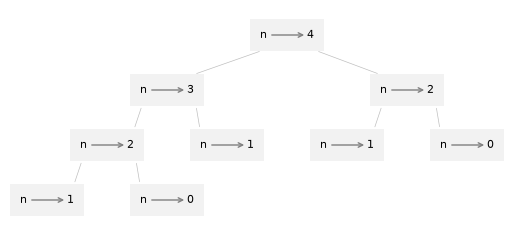
A call graph shows a set of function frames, with lines connecting each frame to the frames of the functions it calls.
At the top of the graph, fibonacci with n=4 calls fibonacci with n=3 and n=2.
In turn, fibonacci with n=3 calls fibonacci with n=2 and n=1. And so on.
Count how many times fibonacci(0) and fibonacci(1) are called.
This is an inefficient solution to the problem, and it gets worse as the argument gets bigger.
The fix from 4.3 is to keep track of values that have already been computed by storing them in a dictionary, where each stored result is a memo. Here is the memoized version again:
known = {0:0, 1:1}

def fibonacci_memo(n):
    if n in known:
        return known[n]

    res = fibonacci_memo(n-1) + fibonacci_memo(n-2)
    known[n] = res
    return res
known starts with the two base cases. Each call either retrieves a cached result or computes and stores a new one. The call graph shows why caching helps: the plain recursive version repeats the same subproblems.
Reset known before timing a first computation. A second call measures retrieval from the cache, which is a different operation. Use a small input for the plain recursive function so the demonstration stays quick.
from timeit import timeit

print('Plain result:', fibonacci(20))
print('Plain seconds:', timeit(lambda: fibonacci(20), number=1))
known = {0: 0, 1: 1}
print('First memoized seconds:', timeit(lambda: fibonacci_memo(20), number=1))
print('Cached seconds:', timeit(lambda: fibonacci_memo(20), number=1))
print('Memoized result:', fibonacci_memo(20))
Plain result: 6765
Plain seconds: 0.0006972259999997732
First memoized seconds: 5.24900001153128e-06
Cached seconds: 5.640000040330051e-07
Memoized result: 6765
### Exercise: Memoize a Function
#   The Lucas numbers start with lucas(0) = 2 and lucas(1) = 1, and each later
#   number is the sum of the two numbers before it.
#   1. Create a dictionary `lucas_known` that maps 0 to 2 and 1 to 1.
#   2. Write `lucas_memo(n)`. If n is a key in lucas_known, return the stored value.
#      Otherwise compute lucas_memo(n-1) + lucas_memo(n-2), store the result in
#      lucas_known, and return it.
#   3. Print lucas_memo(30) and the number of items in lucas_known.
### Your code starts here.


### Your code ends here.
1860498
31