

7.1. Dictionaries#
This chapter presents a built-in type called a dictionary.
It is one of Python’s best features – and the building block of many efficient and elegant algorithms.
7.1.1. What Is a Dictionary?#
A dictionary in Python is a built-in data type used to store data in key–value pairs. A Python dictionary is like a real world dictionary, where you look up a word for its definition. In Python dictionary, you look up a key for the value.
The key characteristics of a dictionary are:
Dictionaries are mutable (can be changed)
Keys must be hashable (strings and numbers; tuples only when every element is hashable)
A dictionary represents a mapping from keys to values.
Keys must be unique
Values can be any data type
Hashable means an object has a hash value that remains stable during its lifetime, and equal objects have equal hashes. Python uses these properties to locate dictionary keys. Strings and numbers are hashable; lists, dictionaries, and sets are not. A tuple such as (1, "apple") is hashable, but (1, ["apple"]) is not because it contains a list.
Hashability is not the same as immutability. A tuple is immutable but can contain an unhashable element. Some user-defined objects are mutable yet hashable by identity; you will meet those objects in the object-oriented programming chapter. For now, choose keys from the familiar hashable types above.
See Python’s definition of hashable.
In terms of formatting,
Each dictionary item consists of a key and a value separated by a colon.
Dictionary items are separated by commas and enclosed in curly braces.
A dictionary is like a list, but more general. In a list, the indices have to be integers; in a dictionary they can be (almost) any type.
Feature |
List |
Dictionary |
|---|---|---|
Access by |
Index (0,1,2) |
Key |
Structure |
Ordered sequence |
Key-value mapping |
Best for |
Ordered data |
Labeled data |
As seen in the example below:
A list of number words can be accessed using an integer as an index.
A dictionary goes in the other direction, and look up a word to get the corresponding integer; in other words, using the keys to look up the values.
nums_lst = ['zero', 'one', 'two']
print(nums_lst)
print(nums_lst[1])

nums_dic = {'zero': 0, 'one': 1, 'two': 2}
print(nums_dic)
print(nums_dic['one'])
['zero', 'one', 'two']
one
{'zero': 0, 'one': 1, 'two': 2}
1
In mathematical language, a dictionary represents a mapping from keys to values, so you can also say that each key “maps to” a value. In this example, each number word maps to the corresponding integer.
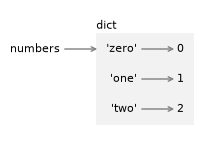
The following figure shows the state diagram for numbers.
A dictionary is represented by a box with the word “dict” outside and the items inside.
Each item is represented by a key and an arrow pointing to a value.
The quotation marks indicate that the keys here are strings, not variable names.
### Exercise: Read a Dictionary Diagram *(basic)*
# The dictionary below maps course codes to course titles.
# 1. Print the title for "DS210".
# 2. Look up the title for "STAT301", store it in a variable named stat_title,
#    and print it.
# 3. Use an f-string and a lookup to print the line:
#    CS101: Introduction to Programming
courses = {
    "CS101": "Introduction to Programming",
    "DS210": "Data Management",
    "STAT301": "Applied Statistics",
}
### Your code starts here.


### Your code ends here.
Data Management
Applied Statistics
CS101: Introduction to Programming
7.1.2. When to Use a Dictionary#
You use a dictionary when:
You need labeled data
You want fast lookups by name
You need a mapping relationship
Examples of dictionaries:
Student records
Configuration settings
Word counts
JSON data
Data often arrives as two parallel lists, one holding the keys and one holding the values. The zip() function from Chapter 6 pairs them up position by position, and dict() turns those (key, value) pairs into a dictionary:
fruits = ["apple", "banana", "cherry"]
prices = [1.25, 0.50, 3.00]

price_of = dict(zip(fruits, prices))
print(price_of)
print(price_of["banana"])
{'apple': 1.25, 'banana': 0.5, 'cherry': 3.0}
0.5
### Exercise: Choose a Mapping *(applied)*
# A small app stores student grades. Use a dictionary when each student name
# should map directly to one numeric grade.
# 1. Build a dictionary named gradebook from names and grades.
# 2. Print Chloe's grade.
# 3. Print the full gradebook.
names = ["Ava", "Ben", "Chloe"]
grades = [94, 87, 91]
### Your code starts here.


### Your code ends here.
91
{'Ava': 94, 'Ben': 87, 'Chloe': 91}
7.1.3. Creating Dictionaries#
Python provides several ways to create a dictionary, depending on whether you already have the data or are building it incrementally.
dict literal: the most common approach to create a dictionary
dict()constructor: to turn sequences into dictionariesdictionary comprehensions: are useful when keys and values come from other sources
Python also has a dict.fromkeys() method, which is a special case in creating dictionaries. Overall, common ways to create a dictionary include:
# |
Method |
Syntax |
Notes |
|---|---|---|---|
1 |
Empty dict literal |
|
Fastest way to create an empty dict |
2 |
Dict literal |
|
Keys and values known up front |
3 |
|
|
Keys must be valid identifiers |
4 |
From list of tuples |
|
Useful when pairs are already in a sequence |
5 |
|
|
All keys share the same default value |
6 |
Dict comprehension |
|
Build from any iterable with an expression |
Pay attention to ways 2, 3, and 4. We usually use dict literal for creating dictionaries but you should know how to use the dict() constructor to turn a sequence into a dictionary. Also, try to transfer your skill in list comprehensions to dictionary comprehensions.
# 1. Empty dict literal
d1 = {}

# 2. Dict literal with items
d2 = {'zero': 0, 'one': 1, 'two': 2}

# 3. dict() constructor with keyword arguments (keys must be valid identifiers)
d3 = dict(zero=0, one=1, two=2)

# 4. dict() from a list of (key, value) tuples
d4 = dict([('zero', 0), ('one', 1), ('two', 2)])

# 5. dict.fromkeys() — all keys share the same default value
d5 = dict.fromkeys(['zero', 'one', 'two'], 0)

# 6. Dict comprehension
words = ['zero', 'one', 'two']
d6 = {word: idx for idx, word in enumerate(words)} # note the two variables

print("Empty literal:       ", d1)
print("Dict literal:        ", d2)
print("dict() keywords:     ", d3)
print("dict() from tuples:  ", d4)
print("dict.fromkeys():     ", d5)
print("Dict comprehension:  ", d6)
Empty literal:        {}
Dict literal:         {'zero': 0, 'one': 1, 'two': 2}
dict() keywords:      {'zero': 0, 'one': 1, 'two': 2}
dict() from tuples:   {'zero': 0, 'one': 1, 'two': 2}
dict.fromkeys():      {'zero': 0, 'one': 0, 'two': 0}
Dict comprehension:   {'zero': 0, 'one': 1, 'two': 2}
To give some details about dictionary creation, let’s use the dictionary literal to create a dictionary, which is to put the items inside curly braces.
numbers = {'zero': 0, 'one': 1, 'two': 2}
Each item consists of a key and a value separated by a colon. The items are separated by commas and enclosed in curly braces.
Another way to create a dictionary is to use the dict function.
We can make an empty dictionary like this.
empty = dict()
empty
{}
Or, if you have a list like [ “zero”, “one”, “two”], you can use enumerate() to create a dictionary.
lst = ["zero", "one", "two "]

dict_words = {}
for idx, word in enumerate(lst):
    dict_words[word] = idx

print(dict_words)
{'zero': 0, 'one': 1, 'two ': 2}
Assignment creates an alias, just as it does for lists in Chapter 6. dict(original) and original.copy() create a separate outer dictionary. Compare the effects of changing an entry through an alias and through a copy:
numbers = {'zero': 0, 'one': 1, 'two': 2}
alias = numbers
numbers_copy = dict(numbers)  # numbers.copy() has the same copying behavior.
alias['one'] = 10
numbers_copy['two'] = 20
print('Original:', numbers)
print('Alias:', alias)
print('Copy:', numbers_copy)
print('Alias is original:', alias is numbers)
print('Copy is original:', numbers_copy is numbers)
Original: {'zero': 0, 'one': 10, 'two': 2}
Alias: {'zero': 0, 'one': 10, 'two': 2}
Copy: {'zero': 0, 'one': 1, 'two': 20}
Alias is original: True
Copy is original: False
The alias refers to the original dictionary, so assigning through the alias changes the original. The copy has its own entries, so replacing an entry in the copy does not replace that entry in the original.
Both dict(original) and .copy() make a shallow copy: they copy the outer dictionary but retain references to its values. Inner lists and dictionaries can still be shared. Section 7.3 demonstrates this with nested student grades and shows how to copy the inner container when independent changes are needed.
dict.fromkeys(keys, value) also reuses one value object for every key. An immutable default such as zero works for independent numeric updates. A list default is shared, so use a comprehension such as {name: [] for name in names} when each key needs its own list. Section 7.3 demonstrates and repairs this shared-list behavior.
### Exercise: Create Dictionaries Three Ways *(basic)*
# 1. Create a dict literal named capitals with Missouri -> Jefferson City
#    and Kansas -> Topeka.
# 2. Create a dictionary named status from the list pairs.
# 3. Use a dictionary comprehension to map each word in words to its length.
# 4. Print all three dictionaries.
pairs = [("draft", 3), ("review", 2), ("done", 5)]
words = ["data", "python", "mapping"]
### Your code starts here.


### Your code ends here.
{'Missouri': 'Jefferson City', 'Kansas': 'Topeka'}
{'draft': 3, 'review': 2, 'done': 5}
{'data': 4, 'python': 6, 'mapping': 7}